epIQ Index Top 100 Communities Report [March 2026]
epIQ Index Top 100 Communities Report [February 2026]

2022 Product Updates: Release 3
Verified Prospect Program
As product authenticity and user generated content become more imperative for companies across all industries, the team at ApartmentRatings & SatisFacts is listening to what renters are saying and implementing new products to provide the content they crave. We hear time and again that the challenge onsite teams face is getting more reviews, so we have implemented another option for renters to add a review – through our Verified Resident Program (VRP).
Verified Prospect Program (VPP) for Unclosed Traffic Insite Surveys: To help our VRP partners improve their online reputation by positively impacting their renter rating as well as review count, we have added VPP to unclosed traffic Insite surveys. All prospects who tour a community that utilizes the unclosed traffic Insite survey module and VRP program will now receive a follow up review request after their initial tour survey.
There is no additional charge for this new feature. Our goal, as always, is to provide renters with the opportunity to share their authentic experiences and to provide our client partners with the tools to promote those experiences and highlight their exceptional communities. As we continuously level up our online review platform, providing increased review opportunities for renters and increased performance opportunities for communities, we remain the leading reputation and resident satisfaction partner in the multifamily industry.
epIQ & Insite Trend Report Updates
As renters’ expectations continue to grow, the team at SatisFacts & ApartmentRatings wants to ensure our multifamily partners have full access to both their data and our education team to help them sort, understand, and create action around that data. We are constantly updating our reporting dashboard to improve access and make understanding and comparing the data easier, and have recently implemented two new updates to provide a better reporting experience.
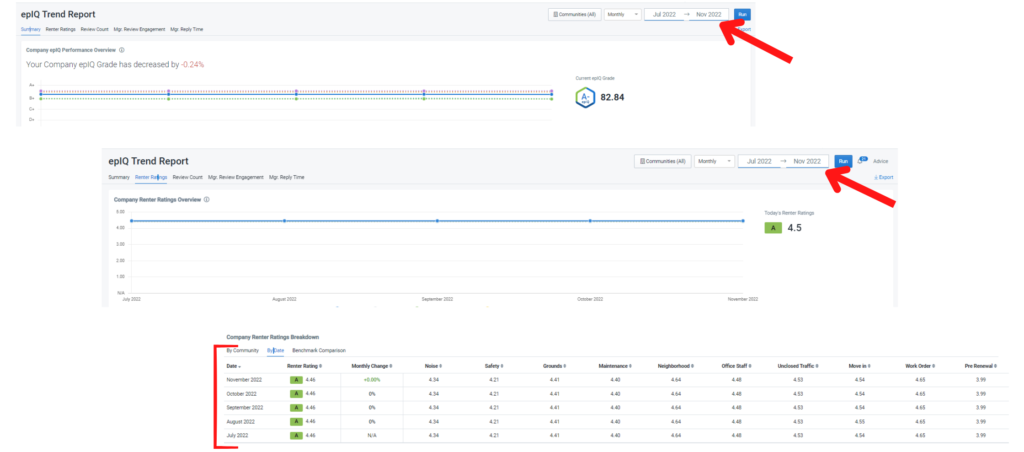
- epIQ Trend Report Fixed Date Range: We have updated the epIQ Trend Report dashboard in Exchange. You can now select a specific time period to view and as you click through the various epIQ components, the time frame will remain the same. Additionally, as you drill down into each community to see their specific trends, the date range will continue to remain the same, until updated again on the main epIQ Trend Report dashboard. This process helps our clients during team trainings and our education team during review sessions and trainings by providing a seamless process for comparing trends and performance across the portfolio.
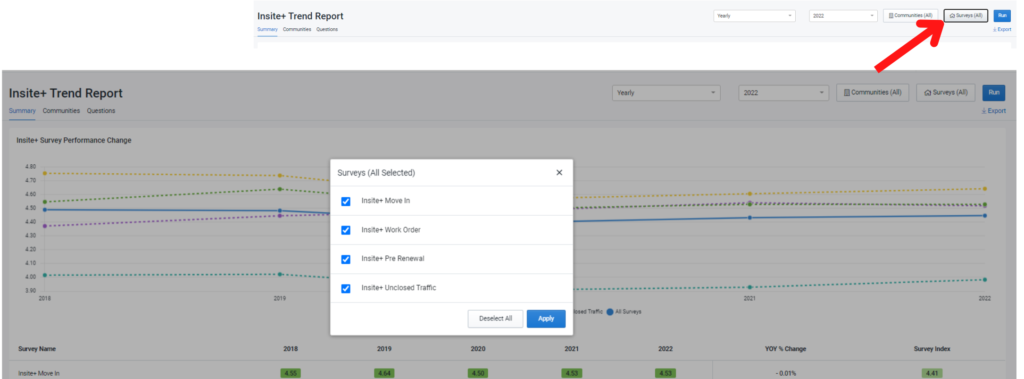
- Insite Survey Trend Report Customization: Users can now select whichever survey types they want to see on the Insite+ Trend Report dashboard.
- How to Use This Feature: When you are viewing your Insite Trend Report in Exchange and want to compare performance by specific survey module, you can now select your preferences to customize the data you want to view by clicking the new Surveys button. Check the survey(s) you want and click Run.
As a Reminder: SatisFacts has integrations with Yardi, RealPage, Entrata, ResMan, AMSI, Jenark, RentManager, and SightPlan, and has the flexibility to work with additional property management systems when applicable. There is no additional cost to set up an API integration to ensure that your resident list is up-to-date and accurate when sending out surveys. This saves time for your team and helps ensure you’re maximizing your survey recruitment efforts to all residents in the most effective and efficient way possible.
Additionally, all communities on ApartmentRatings with one of the above PM systems have the option to a free, limited feed to make sure their community listing is up-to-date with all the marketing content available via syndication. Please feel free to contact us if you would like to add your community or update your information through our free integration.
To learn more about all of our 2022 Product Updates, visit our Product Updates page.
2022 Product Updates: Release 2
Review Responder: Customize Auto-Approval Time Frame
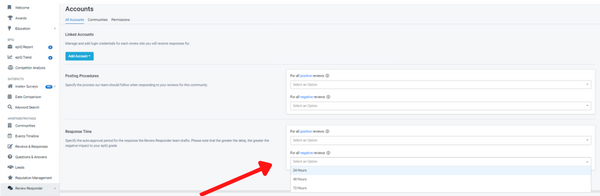
ApartmentRatings clients who utilize our Review Responder service now have the ability to customize their review response auto-approval time frame. In the Review Responder section in Exchange under Accounts, there is now a dropdown to select 24, 48, or 72 hours in the Response Time section. You have the ability to differentiate the response post time for positive reviews (4 & 5 star) and negative reviews. The default setting will continue to be 24 hours, but in order to provide our clients with the flexibility to review our team’s responses and approve them before they are auto-posted, you now have the ability to adjust the time frame to your company and community’s individual needs.
How Does It Work?
- Login to Exchange and click Accounts under Review Responder in the menu. In the Response Time section, select the desired time frame from the dropdown to auto-post review responses from our response team for positive reviews and negative reviews. Click Submit Changes. To note: this only impacts clients who have selected Manage Drafts under their Review Response Posting Procedures.
- You’ll now have more time to review and approve our team’s responses before they automatically post on ApartmentRatings.
- Based on your selected time frame (24, 48 or 72 hours), if you do not edit or approve the response within that window, it will automatically post within the chosen time frame.
Important to Note: The criteria for Reply Time has changed. In order to receive an A+ epIQ Grade for Manager Review Reply Time component, reviews must be responded to within 1.99 days. Please keep this in mind when selecting your auto-approval time frame, as your selection may affect the epIQ Index for your community(ies).
Notification Center in Exchange
Our goal, as always, is to provide our clients with the tools and education to deliver the best customer experience. Our new notification center in Exchange allows our client partners to receive alerts regarding ApartmentRatings Review Scores, epIQ Report Card scores, and Insite and Annual Survey performance trends at both the company and community level. Once logged into Exchange, you will now see a bell icon in the top right corner of the home page. This will open the Notification Center panel, and based on your access level, you will be provided with recent performance changes.
How the Notification Center Works:
The notification center allows you to receive up-to-date notifications about your performance, pinpoint specific areas that may require action, and provides immediate, actionable advice from our education team and the opportunity to schedule an education session.
Notifications for performance changes include:
- Overall Review Rating: If your overall community star rating drops below a 3 out of 5 star rating.
- epIQ Renter Rating Categories: If any of the individual categories of your company or community’s Renter Rating on the epIQ Report card (noise, grounds, safety, office staff, maintenance, neighborhood) drops below a 3 out of 5 star rating.
- epIQ Report Card Components: If any of the epIQ Index primary components (renter rating, review count, manager review engagement, manager review reply time) for your company or community drops 10% or more compared to their previous month’s performance.
- Insite Survey: If the score for any of your Insite Surveys (Move-In, Pre-Renewal, Work Order, Unclosed Traffic) drops below the national average score.
The Notification Center provides the tools needed to easily stay on top of opportunities for improvement and increase resident satisfaction in addition to the option to schedule an education session. With these notifications in place, if you do decide to change your Review Responder Auto-Approval Time, you can monitor how your communities’ epIQ scores are affected and make adjustments if necessary.

User Management & User Log
Additional features that have been added in Exchange to provide our client partners with more flexibility and increased access are the User Management Password Reset feature and User Log feature. While our team is happy to continue to add users, change users, and reset passwords, we want to ensure our clients have easy access to the Exchange Platform. Two updates we have recently made to provide clients with increased use are:
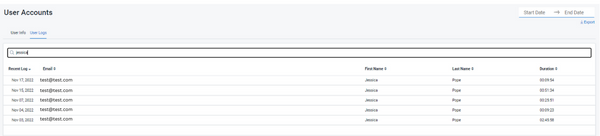
- User Log: This feature allows high level Exchange users to view a log of all of their team members that are set up in Exchange, and see how often and how long they are spending in Exchange. Simply login to Exchange and select User Accounts on the left menu. Then click the User Logs tab. You can filter by a date range and sort by name, email address and other features, and export the report to get a more in depth look.
- User Account Password Reset: High level Exchange users can now Add, Update & Reset User Passwords in the User Accounts menu. Simply login to Exchange and select User Accounts on the left menu. Then click the User Info tab and select Edit next to the user from the list. You can edit the user’s name, send them a Reset Password, and update their teams and permissions as well.
We want all team members to have access to all of the helpful information in Exchange, from the competitor analysis to performance reporting to the education library with free webinars, videos, articles and more. We hope to have achieved this by providing easy access to add or update users and reset passwords to quickly and effectively give new team members the information they need to be successful in their roles.
To learn more about all of our 2022 Product Updates, visit our Product Updates page.
Power Panels – Review Generation Reality: Facts vs Fiction
2022 Product Updates: Release 1
1. Rate Onsite Team Members on ApartmentRatings
As ratings and reviews have become a primary source for renters when shopping for apartments, it has become more important than ever to highlight what makes a community stand out among the rest. While the onsite teams and the quality of service are what make a prospect want to lease and a renter want to stay, when a renter is in their initial shopping stage, they are looking for what makes the community itself a great fit for them. They are looking for a well-rounded description of the community that will fit their needs. That includes the community amenities, key apartment features, neighbors and/or neighborhood and ease of access to the onsite team and the resident systems. Through an abundance of user testing, we have seen the proof – 90% of the time, renters will select communities with a well-rounded review of the community over a review regarding a specific team member(s). Renters understand that Property Manager “Sarah” may not always be there, and they need to know the community will still fit their needs after she’s gone.
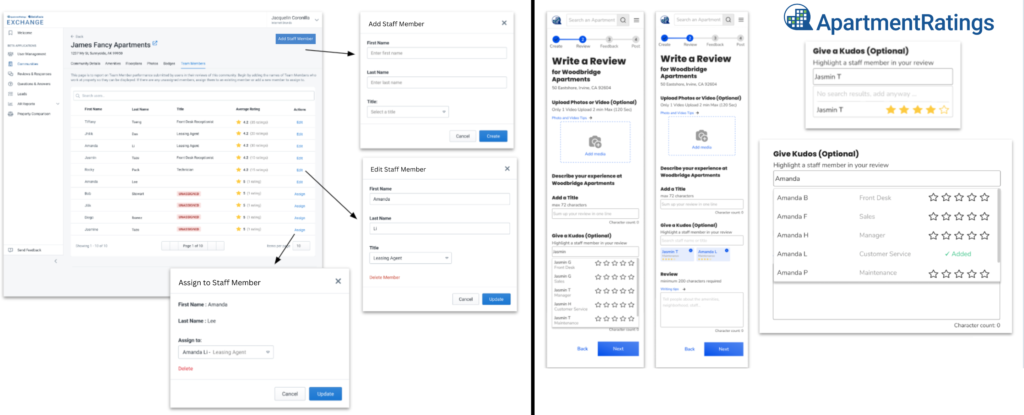
With that being said, we know it can be hard to encourage prospects and renters to leave reviews, and it often falls on team members to do the work of getting them. It only makes sense that they should be rewarded for their efforts. Which is why we have added a new feature to the Exchange and ApartmentRatings platform. Our new team member rating feature offers renters the ability to highlight onsite team members before they write a review, leaving them free to share an authentic, well-rounded community review without having to mention team names in the review description. There are several advantages for both renters and manager center users. Manager center users no longer have to manually check all reviews for a team member name; this information can be pulled through a report in Exchange to get accurate results more quickly and effectively. For renters, they can focus their review description on the community and their overall experience to provide a better quality review that will ultimately help other renters in their decision process.
How Team Member Rating Works:
- To add team members in Exchange, login and select Communities in the menu under the ApartmentRatings section. Select the community and click on Staff Members and then the Add Staff Member button in the top right corner. The names added in Exchange will appear in a dropdown on ApartmentRatings for prospects and renters to select which team member(s) they want to give kudos to when beginning their “Write A Review” process.
- If a team member’s name is not already listed in the dropdown, renters have the ability to manually add the team member’s name before they get to the review description. The team member’s name will then appear in the Staff Member section in Exchange where they can then be edited and/or assigned to the community to be able to be included in reports.
By adding this feature, we are optimizing the opportunities for communities on ApartmentRatings to receive more leads, and in turn more renters, by ensuring the reviews tell a complete and authentic story of their community, while also providing a more effective solution for tracking individual team members’ review performance to assist with employee bonus structures.
2. Technician & Agent Performance Tracking Reporting for Insite Surveys
We know how important performance tracking is in the multifamily industry and we continue to work to enhance our Exchange performance and reporting platform in order to provide our client partners with easier, more effective performance measurement tools. With our SatisFacts Insite Surveys being one of the most important tools for measuring resident satisfaction, we have recently added a new feature to our Insite Work Order and Unclosed Traffic touchpoint surveys.
What Is It & How Does It Work?
Exchange users now have the ability to access performance reporting on individual maintenance technicians and leasing team members.
- Maintenance Technician: When a work order is closed out, the maintenance technician that completed the work (or was designated as the technician who completed the work in the property’s CRM) will be automatically linked to the survey that is sent to the resident. So once the resident completes a work order survey, the survey reports section in Exchange under Insite+ Work Order now includes a tab titled Technician Performance to track the individual’s performance.
- Leasing Agent: When a prospect completes a tour and is sent an Unclosed Traffic survey, it will automatically be designated to the team member who toured that prospect (or who was designated as the agent in the property’s CRM). In the survey reports in Exchange under Insite+ Unclosed Traffic, there is now a tab titled Agent Performance to track the individual’s performance.
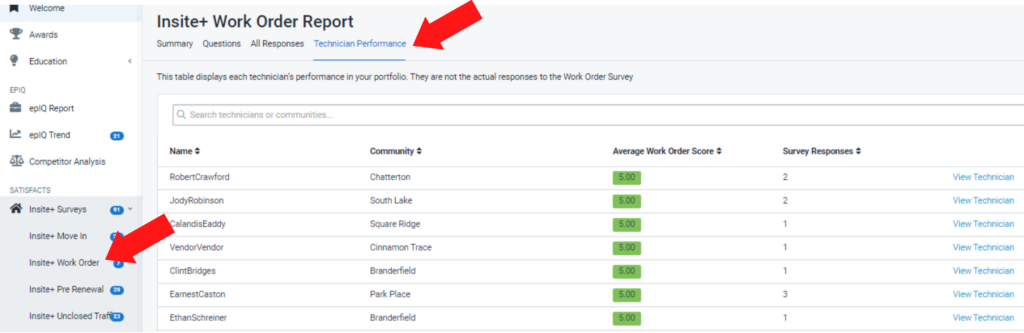
The reports can be filtered by name, time period, as well as by community. If a leasing agent and/or maintenance technician works at or fills in for multiple communities, reports that are filtered by community will be able to break down any potential discrepancies in an individual’s performance from community to community.
3. Keyword Search Tool in Exchange
The new performance tracking features for ApartmentRatings reviews and Insite surveys offer more effective processes for tracking individual performance as well as better reporting. In addition, we have built a new tool in Exchange to assist our client partners in learning and understanding their customers’ needs and wants by having the ability to search for keywords and phrases in real-time from all survey comments and reviews.
While word clouds provide a surface-level visual representation of frequently used terms, our Keyword Search tool allows users to drill down into those terms, providing context and details to learn more about specific issues, which can then be added to action plans as a team focus for improving resident satisfaction.
Additional Benefits of the Keyword Search Tool:
- Assists in finding areas of opportunity and points of success for your teams and communities.
- Assists in finding employees in review descriptions or survey comments who may not have been correctly added as team members in Exchange or correctly assigned to a work order or unclosed traffic survey to make sure they get properly assigned and recognized.
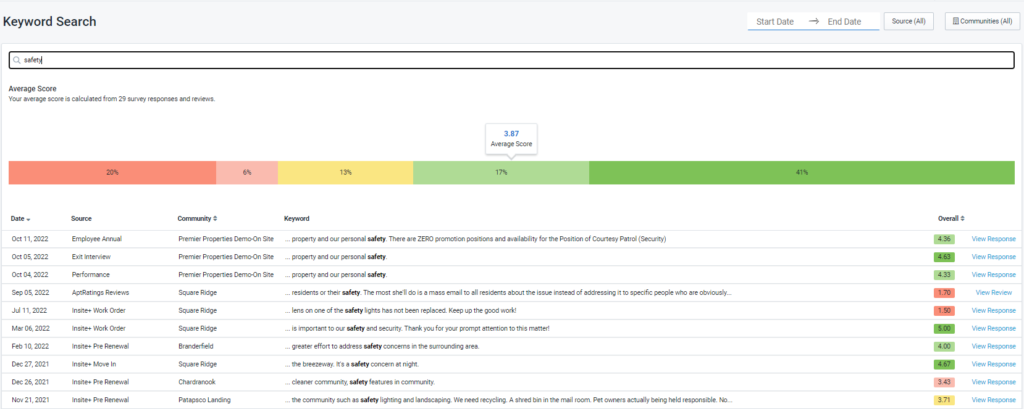
These new features offer more effective and measurable tracking to assist our multifamily partners with bonus incentives and education and training opportunities for employees, and provide opportunities to increase resident satisfaction with more clarity on specific needs within your teams and communities.
To learn more about all of our 2022 Product Updates, visit our Product Updates page.